¶ Auto Calibrate Pressure Advance
As we know, different filaments, printing speeds, temperatures, etc. have different PA values that affect print quality significantly. Until now, very few printers on the market have automated PA calibration; many still require manual calibration, which is time-consuming and not everyone can do.
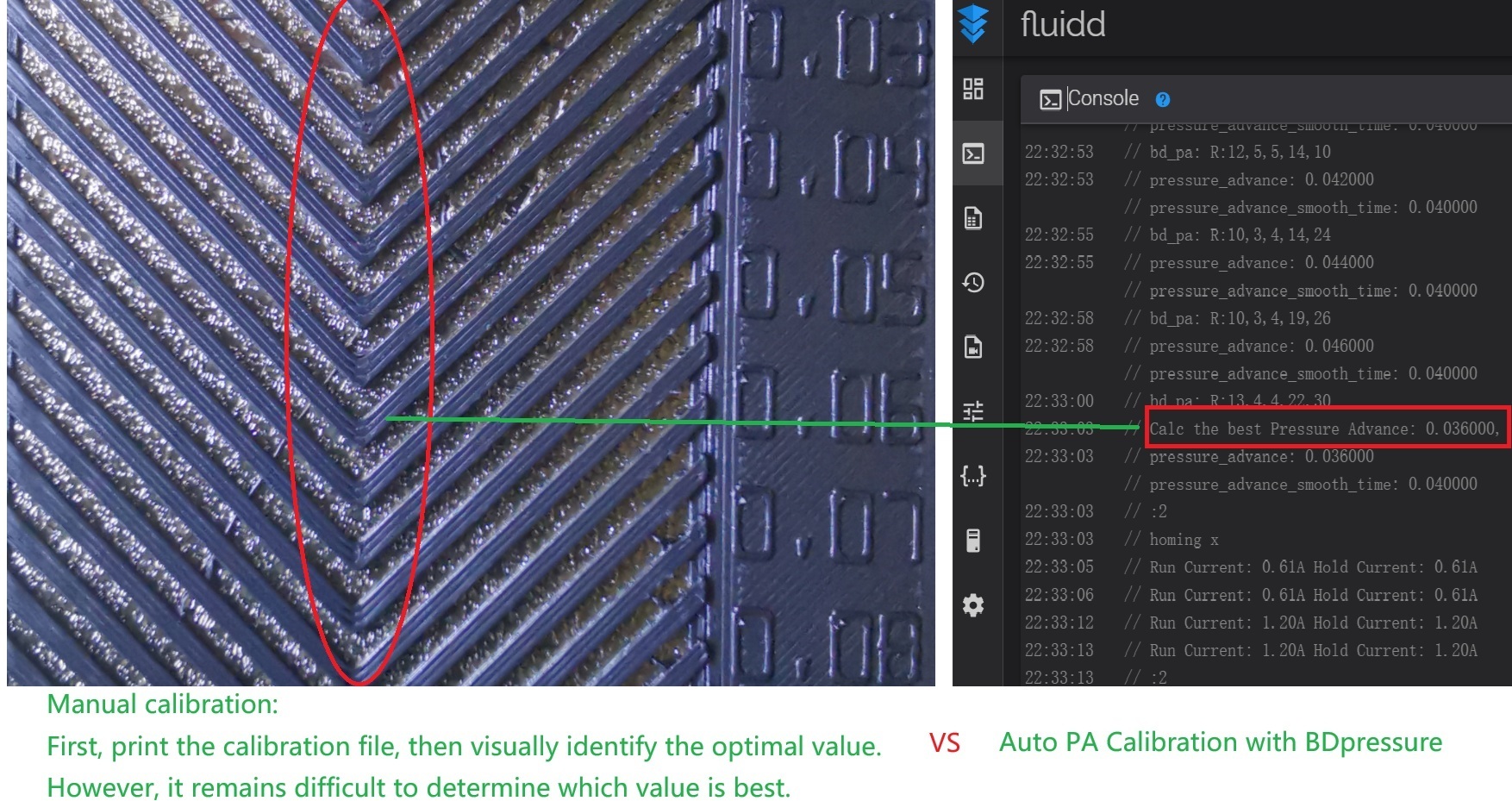
¶ Features:
- Automated Pressure Advanced Calibration
- Nozzle Probe
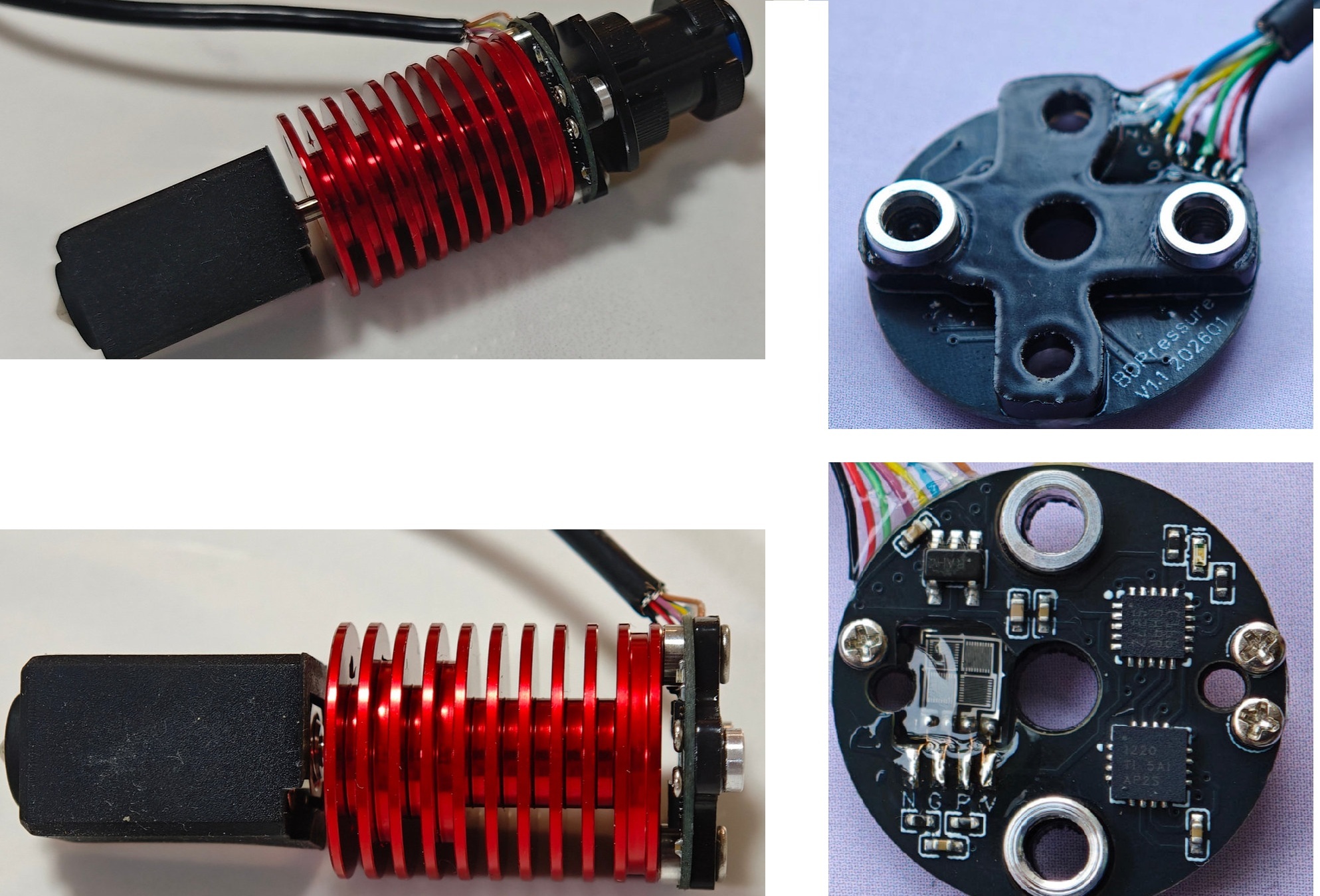
- All in one: No external PCB board, USB/I2C
- Compatible with E3D/voron printers
¶ How it works?
-
PA Mode:
Without printing calibration lines, it just simulate extrusion pressure behavior during acceleration and deceleration while only the extruder is working. This work process is similar to the Bambu Lab A1 printer, instead, I use strain gauge, not eddy sensor. -
Nozzle Probe Mode:
Use the strain gauge to sense the nozzle pressure while probing. It works as a normal switch endstop sensor, so we can just power it and connect the Z- pin on the mainboard.
¶ Mounting
- Compatible Hotends
BDPressure E supports hotends with a removable groove mount, such as the Rapid Hotend and TZ-V6. Other E3D- or Voron-style hotends may also be compatible if their mounting dimensions and design match, although some may require a custom adapter or toolhead mount.
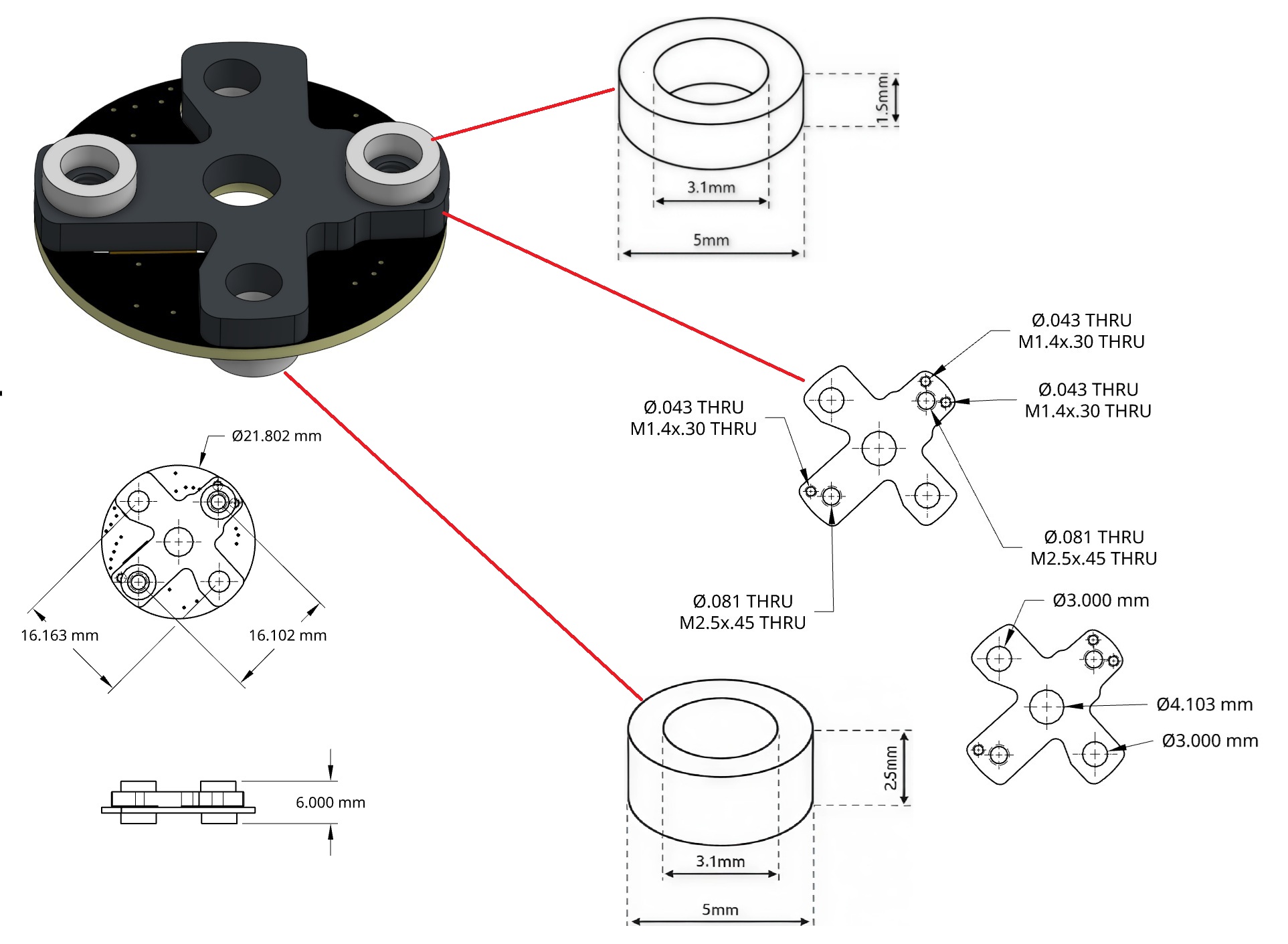
There are two M2.5 mounting holes. Please ensure that they are not too long, as this could damage either the PCB or the strain gauge sensor at the bottom.
¶ Connection
-
Hardware V1.1
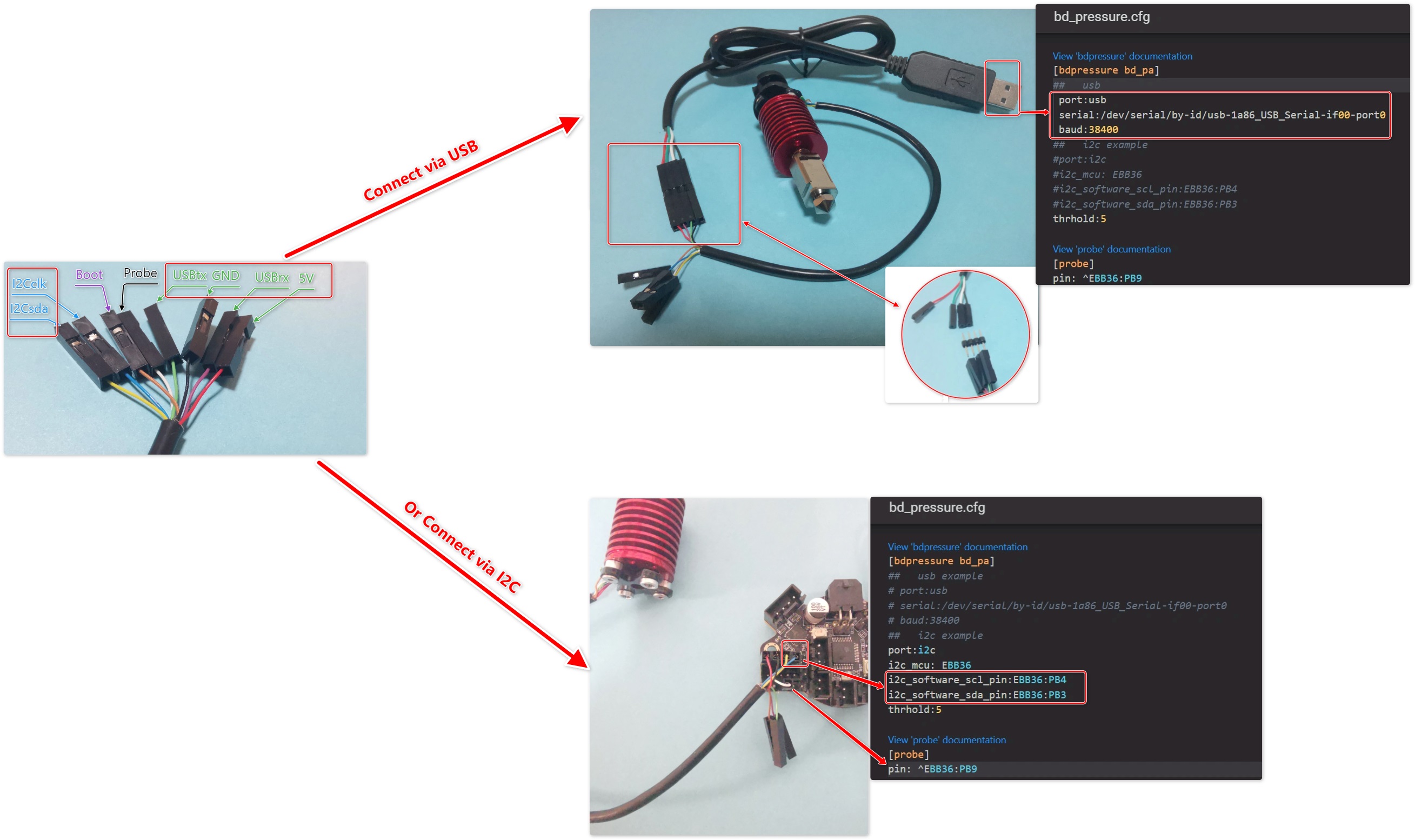
-
Hardware V1.2
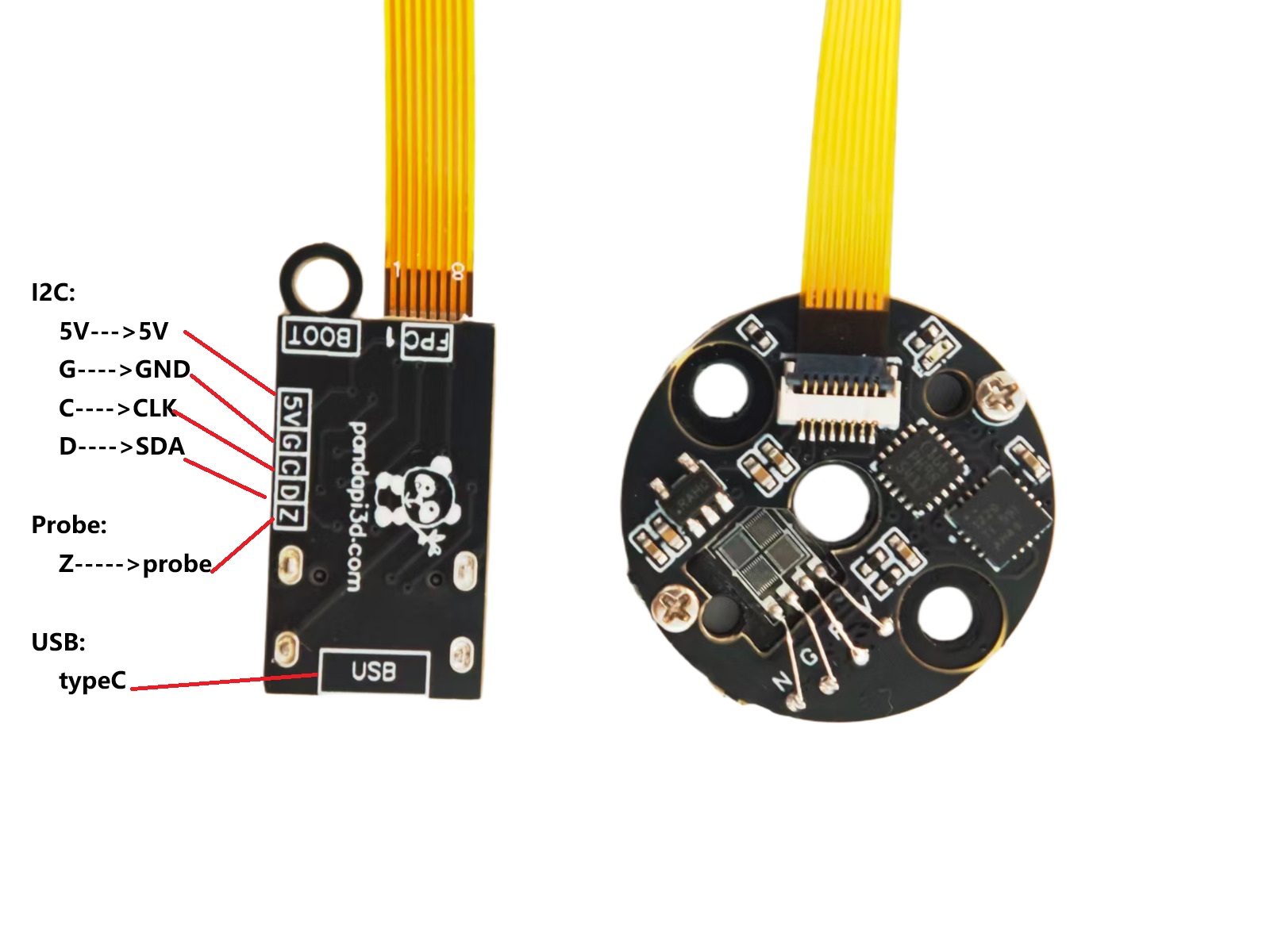
¶ klipper
¶ 1. Install software module
cd  ~
git clone https://github.com/markniu/bd_pressure.git
chmod 777 ~/bd_pressure/klipper/install.sh
~/bd_pressure/klipper/install.sh
¶ 2. Configure Klipper
- Upload the bd_pressure.cfg into the printer config folder and add [include bd_pressure.cfg] into the printer.cfg ,
[include bd_pressure.cfg]
- Edit the bd_pressure.cfg
Change the pins to your actual used in the section[probe], and section[bdpressure bd_pa]
For example:
[bdpressure bd_pa]
##   usb example
# port:usb
# serial:auto  # serial:/dev/serial/by-id/usb-1a86_USB_Serial-if00-port0
# #serial:/dev/serial/by-id/usb-1a86_USB_Serial-if00-port0  ## uncomment this if you only have bd_pressure an no bd_width device
# #serial:/dev/serial/by-path/ReplaceWithYourDevicePath  # You need to use ls /dev/serial/by-path , and determine which entry belongs to bd_pressure. if yu change the port it's plugged into, you will need to adjust this after doing so to reflect the new usb port you moved it to.
# baud:38400

##   i2c example
port:i2c
i2c_mcu: mcu
i2c_software_scl_pin:PE14
i2c_software_sda_pin:PE15
thrhold:4    # thrhold for the probe triger value,recommend value 3 to 10

[probe]
pin: ^PE13
x_offset: 0
y_offset: 0
z_offset: -0.03
speed: 9
lift_speed:9
samples: 2
samples_result: median
sample_retract_dist: 3
samples_tolerance: 0.03
samples_tolerance_retries: 5
activate_gcode:
  PA_RESET
  PA_RESET
¶ 3.Probe Test
Just Run G28 to Home the printer,but be careful when homing the Z axis, as this may damage your printer if there are any problems.
¶ 3.Pressure Advance Calibration Test
Please ensure that the filament has been loaded into the nozzle, then run the following G-code:
G28
G1 Z40
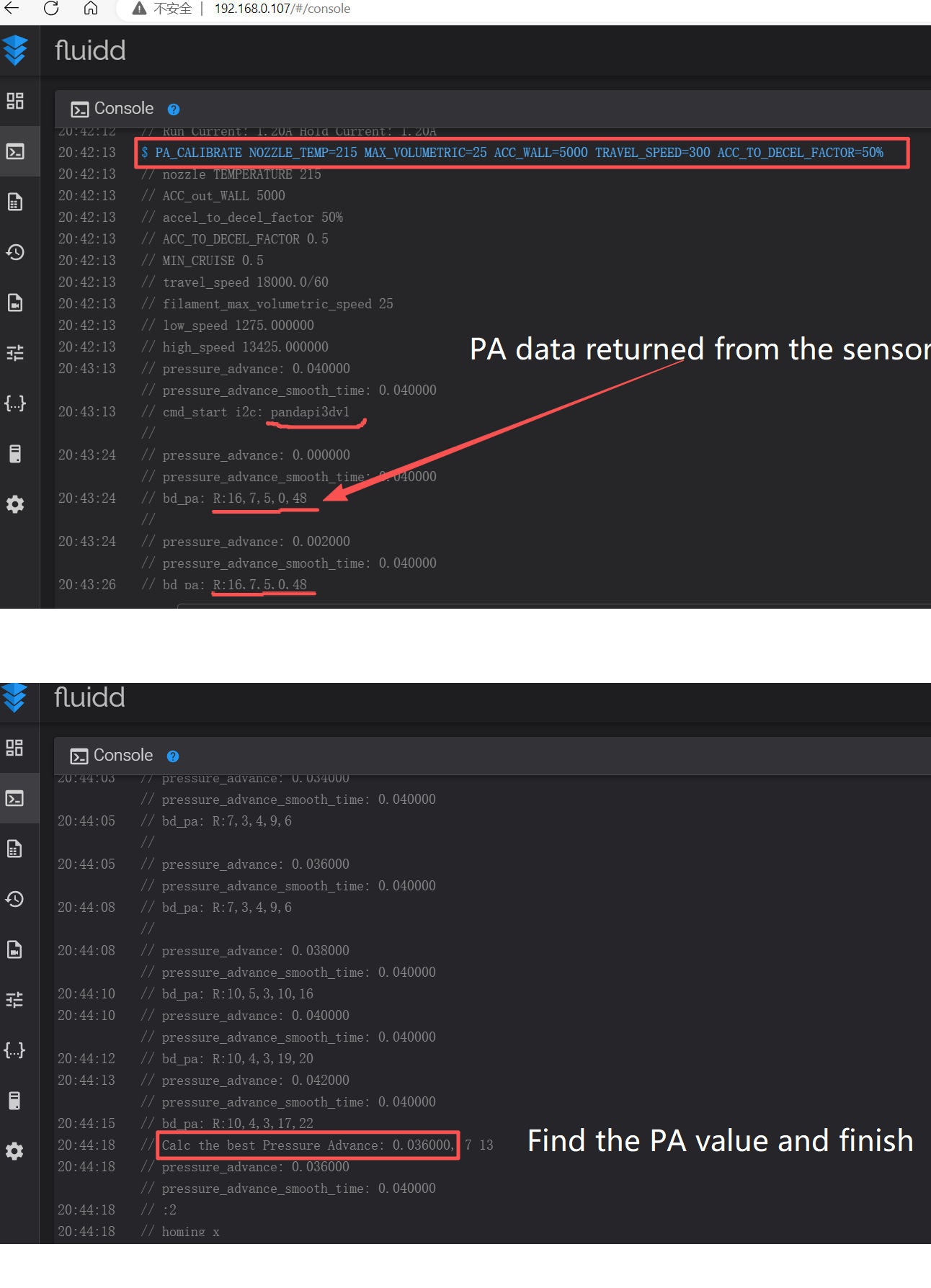
PA_CALIBRATE NOZZLE_TEMP=215 MAX_VOLUMETRIC=25 ACC_WALL=5000  TRAVEL_SPEED=300  ACC_TO_DECEL_FACTOR=50%
Then the printer will perform the following actions in order: home, heat the nozzle, perform PA calibration and set the value in the printer itself with the command SET_PRESSURE_ADVANCE.
The following screenshot shows the expected data.
¶ 4. OrcaSlicer:
-
Disable the Pressure advance in the Material settings.
-
Add the following G-code lines into the beginning of the Start_Gcode in the slicer, then it will do pressure advance calibration with your setting and automatically set the right PA value.
G28                    ; Home all the axis
G1 Z30                 ; Move to the poop position. You can modify it depending on your printer.
G1 X240 Y240           ; Move to the poop position. You can modify it depending on your printer.

PA_CALIBRATE NOZZLE_TEMP=[nozzle_temperature] MAX_VOLUMETRIC=[filament_max_volumetric_speed] ACC_WALL=[outer_wall_acceleration]  TRAVEL_SPEED=[travel_speed]  ACC_TO_DECEL_FACTOR=[accel_to_decel_factor] NOZZLE=[nozzle_diameter] FLOW=[filament_flow_ratio]
Prusa Slicer:
G28                    ; Home all the axis
G1 Z30                 ; move to the poop position
G1 X240 Y240

PA_CALIBRATE NOZZLE_TEMP=[temperature] MAX_VOLUMETRIC=[filament_max_volumetric_speed] ACC_WALL=[outer_wall_acceleration]  TRAVEL_SPEED=[travel_speed]  MINIMUM_CRUISE_RATIO=0.5 NOZZLE=[nozzle_diameter] FLOW=[extrusion_multiplier] #ACC_TO_DECEL_FACTOR=[accel_to_decel_factor] this klipper specifc variable was replaced in Klipper with MINIMUM_CRUISE_SPEED. and the 0.5 is the default 50% which can be adjusted to suite the printer's capabilities.
¶ Note:
- The hotend must be vertical to the bed, this note is only for E3D style hotend
- Problem:
If the hotend is not vertical, the probe data maybe be not stable. - Solution:
please rotate the whole hotend or PA sensor, for example 180 degree
-
FAN:
This sensor is very sensitive and it can sense the vabration of the fan on the hotend too.
that means if the probe accuracy must be controlled within 0.005 millimeters, vibration issues from the hot-end fan must be taken into account.
you can close the hotend fan by setting the hotend to low temperature before do probe -
There are two M2.5 mounting holes. Please ensure that they are not too long, as this could damage either the PCB or the strain gauge sensor at the bottom.
-
There is no PA data on the console?
- check the connection by seeing if there is pandapi3dv on the console
- Make sure filament is loaded into the nozzle before testing.
¶ Others:
¶ FAQ:
¶ Q: Probe samples exceed tolerance. Retrying…
A: Rotate the sensor 180 degrees and reinstall it.
¶ Q: Calc the best Pressure Advance error!
How to Find the Best Pressure Advance
BDPressure tests PA values from low to high:
0.000, 0.002, 0.004, 0.006...
For each PA value, the sensor returns:
R:res,lk,rk,Hk,Ha
The software uses Hk and Ha to find the valid calculation region.
Then it calculates:
score = res + abs(Ha)
The PA with the lowest score is selected as the best PA.
Example:
PA=0.020  res=30  Hk=4  Ha=6  score=36
PA=0.022  res=24  Hk=5  Ha=5  score=29
PA=0.024  res=18  Hk=6  Ha=3  score=21  <-- Best
PA=0.026  res=22  Hk=7  Ha=4  score=26
Best PA = 0.024
Quick Console Check
Focus on:
PA | res | Hk | Ha | score
Check:
- PA increases normally.
- Hk / Ha pass through the threshold around 5.
- res changes as PA changes.
- score = res + abs(Ha).
- The lowest score indicates the best PA.
If you see:
Calc the best Pressure Advance error!
check Hk and Ha first. If they do not pass through the expected threshold region, the software may not find a valid PA range.